---
title: Alternator
id: morered:alternator
type: block
---

The Alternator is a redstone-signal-emitting block which can be rotated by mechanical power to cycle which side it outputs redstone on.

<table>
	<thead><tr><th>Contents</th></tr></thead>
	<tbody><tr><td>
		1. [Recipes](#recipes)
		2. [Usage](#usage)
		3. [Data](#data)
		4. [History](#history)
	</td></tr></tbody>
</table>

## Recipes

<table>
	<thead>
		<tr>
			<th>Recipe Type</th>
			<th>Ingredients</th>
			<th>Output</th>
			<th>Example</th>
		</tr>
	</thead>
	<tbody>
		<tr>
			<td>Shaped Crafting</td>
			<td style={{width: '30%'}}>
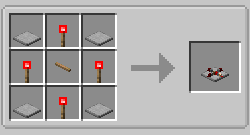
				* 4x [<ModAsset width={32} height={32} location='morered:item/stone_plate'/> Stone Plate](@morered:stone_plate)
				* 4x [<ModAsset width={32} height={32} location='redstone_torch'/> Redstone Torch](@redstone_torch)
				* 1x [<ModAsset width={32} height={32} location='morered:item/oak_axle'/> Axle](@morered:oak_axle)
			</td>
			<td>
				* 1x Alternator
			</td>
			<td>
				<br/>
				![Shaped Crafting Recipe for Alternators](https://commoble.s3.us-east-1.amazonaws.com/images/morered/recipes/alternator_recipe.png)
			</td>
		</tr>
		<tr>
			<td>[Soldering]('/en/mod/morered/docs/content/soldering_table')</td>
			<td style={{width: '30%'}}>
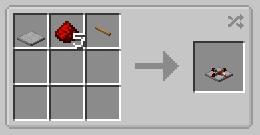
				* 1x [<ModAsset width={32} height={32} location='morered:item/stone_plate'/> Stone Plate](@morered:stone_plate)
				* 5x [<ModAsset width={32} height={32} location='redstone'/> Redstone Dust](@redstone)
				* 1x [<ModAsset width={32} height={32} location='morered:item/oak_axle'/> Axle](@morered:oak_axle)
			</td>
			<td>
				* 1x Latch
			</td>
			<td>
				<br/>
				![Soldering Recipe for Alternators](https://commoble.s3.us-east-1.amazonaws.com/images/morered/recipes/alternator_from_soldering.png)
			</td>
		</tr>
	</tbody>
</table>

## Usage

The Alternator can be placed in 24 different orientations, on floors, walls, and ceilings.

When placing the block, the flat side will be placed against the face clicked by the player, and the output side will point to the edge of the clicked face nearest to where the player clicked. A transparent preview is rendered to assist with orienting the block; this can be disabled in the [Client Config](/en/mod/morered/configuration/client_config) if this is undesired.

![A preview of an Alternator about to be placed against a wall with the output facing up](https://commoble.s3.us-east-1.amazonaws.com/images/morered/alternator_preview.png)

The sprint key can be held while placing the block to change the axis of rotation.

When the alternator's center axle is rotated by mechanical power, it will cycle between its four output sides. Redstone power will be emitted on one side at a time.

![Alternator being rotated by a windcatcher, gears, and axle](https://commoble.s3.us-east-1.amazonaws.com/images/morered/alternator.png)

## Data

| Blockstate Properties | Values | Description
| --- | - | -
| `facing` | `{"down", "up", "north", "south", "west", "east"}` | Direction to the neighbor block the plate is attached to
| `rotation` | `[0,3]` | Rotations about the axis of attachment in 90-degree increments (which side the alternator points to when not being rotated)
| `axle_rotation` | `[0,3]` | Further rotations about the axis of attachment in 90-degree increments while being rotated
| `waterlogged` | `{false, true}` | Whether the block is waterlogged

| Tint Index | Tint Value
| --- | -
| 0,1,2,3 | `0xFFFFFFFF` if `axle_rotation` is equal to this tintindex, otherwise `0xFF560000`

## History
| Version | Changelog
| --- | -
| 1.21.8-8.0.0.0 | Added to More Red