---
title: How to Animate your model
hide_meta: true
---
## How to get to the Animation window
- Open your AzureLib project in Blockbench and you'll see (by default) to the far right side a tab called `Animate`
- Click this and you will now now be in the Animation tab.
- Create a new animation in the Animations panel on the left side by pressing the + icon and name it whatever you want. (Example: animation.idle)
- You can select the bones and start animating!
# Video Guide
Here is a video guide that covers some basics of animating in Blockbench, it's not exactly for AzureLib but applies about 90%
## How to use use Easings
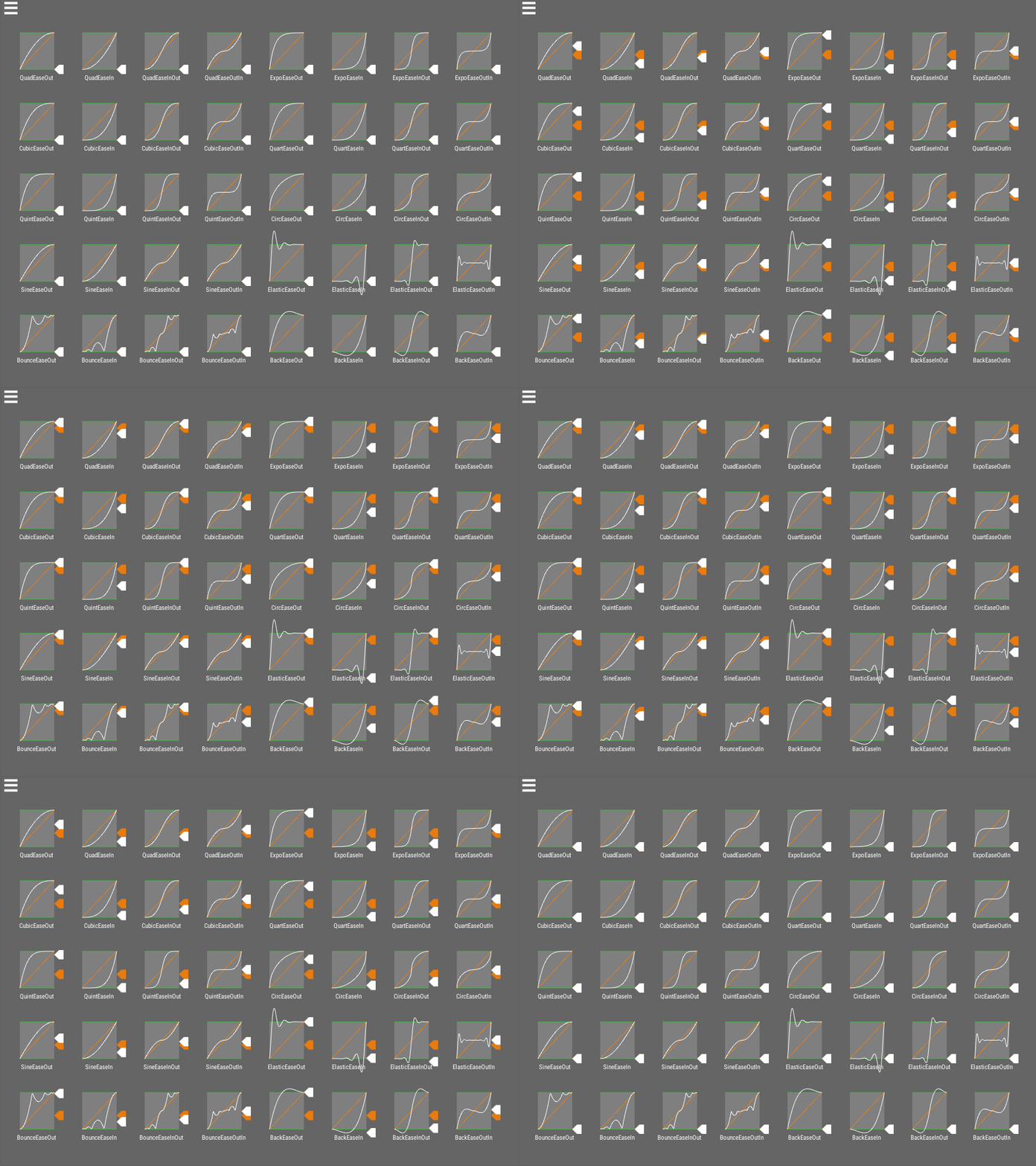
**What is an Easing Curve?**
An easing curve is a mathematical function used to make animations feel more natural and dynamic. Instead of using a straight, linear transition, it controls how the animation progresses over time.
### How Does it Work?
Rather than moving at a constant speed, the animation's progress (or "tween") follows the shape of the easing curve. This allows for a variety of effects, such as:
- **Smooth start and stop**: The animation gradually speeds up and slows down.
- **Overshooting**: An object goes past its destination and slides back into place (using a "back" curve).
- **Bouncing**: An object bounces as it reaches its target (using a "bounce" curve).
Easing curves help make animations look more realistic and visually appealing.
Image Credit to [Unity-EasingLibraryVisualisation](https://github.com/noisecrime/Unity-EasingLibraryVisualisation)
## How to use Molang
See [Adding Custom Molang Queries](../molang/molang) for how to register your own Molang Queries.
Molang empowers you to input mathematical expressions as keyframe values, extending beyond mere numerical inputs. You can employ mathematical functions such as `math.sin`, `math.cos`, and `math.abs`. Detailed information on these math functions can be found on the [Bedrock Wiki](https://bedrock.dev/docs/1.19.0.0/1.19.30.23/Molang#Math%20Functions).
### Supported Queries
Every query can be written with the full `query.` prefix or the short `q.` prefix, so `query.is_on_ground` and `q.is_on_ground` are the same query. Queries that don't apply to what's being animated (for example `query.health` on an item) return `0`. Values that are true or false return `1` or `0`.
#### General
- `query.anim_time`
- Represents the animation time in seconds.
- `query.life_time`
- Represents the total lifetime of the entity or object, in seconds.
- `query.actor_count`
- Returns the number of entities currently loaded in the world.
- `query.time_of_day`
- Represents the current time of day in the game as a fraction (0.0 to 1.0).
- `query.day`
- Returns the current day of the world.
- `query.time_stamp`
- Returns the world's game time in ticks.
- `query.moon_phase`
- Returns the current phase of the moon as an integer (0 = full moon to 7).
- `query.moon_brightness`
- Returns how bright the moon is, from 1.0 (full moon) to 0.0 (new moon).
- `query.frame_alpha`
- Returns how far between two game ticks the current frame is (0.0 to 1.0).
- `query.client_max_render_distance`
- Returns the client's render distance in chunks.
#### Entity State
- `query.is_alive`
- Returns whether the entity is alive.
- `query.is_on_ground`
- Returns whether the entity is on the ground.
- `query.in_air`
- Returns whether the entity is currently off the ground (e.g., jumping or falling).
- `query.is_moving`
- Returns whether the entity is moving horizontally.
- `query.is_in_water`
- Returns whether the entity is currently in water.
- `query.is_in_water_or_rain`
- Returns whether the entity is in water or exposed to rain.
- `query.head_is_in_water`
- Returns whether the entity's head is underwater.
- `query.is_in_lava`
- Returns whether the entity is in lava.
- `query.is_on_fire` (or `query.is_onfire`)
- Returns whether the entity is on fire.
- `query.is_fire_immune`
- Returns whether the entity is immune to fire.
- `query.is_invisible`
- Returns whether the entity is invisible.
- `query.is_silent`
- Returns whether the entity is silent.
- `query.is_sneaking`
- Returns whether the entity is sneaking (crouching).
- `query.is_sprinting`
- Returns whether the entity is sprinting.
- `query.is_swimming`
- Returns whether the entity is swimming.
- `query.is_gliding`
- Returns whether the entity is gliding with an elytra.
- `query.is_sleeping`
- Returns whether the entity is sleeping.
- `query.is_riding`
- Returns whether the entity is riding another entity.
- `query.has_rider`
- Returns whether another entity is riding this entity.
- `query.is_leashed`
- Returns whether the entity is leashed.
- `query.is_tamed`
- Returns whether the entity is tamed.
- `query.is_sitting`
- Returns whether a tamed entity is sitting.
- `query.is_baby`
- Returns whether a living entity is a baby.
- `query.has_gravity`
- Returns whether the entity is affected by gravity.
- `query.has_collision`
- Returns whether the entity collides with blocks.
- `query.is_spectator`
- Returns whether the entity (a player) is in spectator mode.
- `query.is_local_player`
- Returns whether the entity is the player playing on this client.
- `query.is_first_person`
- Returns whether the entity is the camera entity and the camera is in first person.
#### Health and Combat
- `query.health`
- Returns the current health of a living entity.
- `query.max_health`
- Returns the maximum health of a living entity.
- `query.hurt_time`
- Returns the remaining time in the entity's hurt animation.
- `query.death_ticks`
- Returns the number of ticks since the entity started dying.
- `query.is_blocking` (or `query.blocking`)
- Returns whether the entity is actively blocking (e.g., holding a shield in defense).
#### Movement and Rotation
- `query.ground_speed`
- Represents the entity's movement speed while on the ground.
- `query.vertical_speed`
- Returns how fast the entity is moving up (positive) or down (negative), in blocks per second.
- `query.yaw_speed`
- Represents the rate of change of the entity's yaw (horizontal rotation).
- `query.limb_swing`
- Represents the current state of the entity's limb swinging animation (e.g., for walking or running).
- `query.limb_swing_amount`
- Represents the intensity or speed of the entity's limb swing animation.
- `query.head_pitch` (or `query.head_x_rotation`)
- Represents the vertical rotation of the entity's head (looking up or down).
- `query.head_yaw` (or `query.head_y_rotation`)
- Represents the horizontal rotation of the entity's head relative to the body.
- `query.body_x_rotation`
- Returns the entity's body pitch, in degrees.
- `query.body_y_rotation`
- Returns the entity's body yaw, in degrees.
- `query.cardinal_facing_2d`
- Returns the direction the entity is facing (2 = north, 3 = south, 4 = west, 5 = east).
- `query.distance_from_camera`
- Returns the distance between the entity or object and the camera/player.
- `query.model_scale`
- Returns the entity's scale.
- `query.swim_amount`
- Returns how far the entity is into its swimming pose (0.0 to 1.0).
#### Items and Equipment
- `query.is_using_item`
- Returns whether the entity is actively using an item (e.g., eating or drinking).
- `query.item_in_use_duration`
- Returns how long the entity has been using its current item, in seconds.
- `query.item_remaining_use_duration`
- Returns how long the entity has left to use its current item, in seconds.
- `query.item_max_use_duration`
- Returns the full use time of the item being used, in seconds.
- `query.has_head_gear`
- Returns whether the entity has an item in its head slot.
- `query.equipment_count`
- Returns the number of armor pieces the entity is wearing (0 to 4).
- `query.player_level`
- Returns the player's experience level, or 0 for non-players.
- `query.item_current_durability`
- Represents an item's durability as a fraction of its maximum durability.
- `query.max_durability`
- Returns the maximum durability of the item being animated.
- `query.remaining_durability`
- Returns how much durability the item being animated has left.
- `query.item_is_enchanted`
- Returns whether the item is enchanted.
### Query Functions
These queries take arguments, so they are always written with parentheses, e.g. `query.position(1)`. Arguments can be numbers or any other Molang expression.
- `query.position(axis)`
- Returns the entity's world position on an axis (0 = x, 1 = y, 2 = z).
- `query.position_delta(axis)`
- Returns how far the entity is moving this tick on an axis.
- `query.movement_direction(axis)`
- Returns the entity's normalized movement direction on an axis.
- `query.is_item_equipped(hand)`
- Returns whether a hand holds an item (0 = main hand, 1 = off hand). The hand can be left out to check the main hand: `query.is_item_equipped()`.
- `query.has_armor_slot(slot)`
- Returns whether an armor slot has an item (0 = head, 1 = chest, 2 = legs, 3 = feet).
- `query.armor_damage_slot(slot)`
- Returns the damage value of the item in an armor slot.
- `query.heightmap(x, z)`
- Returns the height of the world surface at a world position.
- `query.above_top_solid(x, z)`
- Returns the height just above the highest solid block at a world position.
- `query.camera_distance_range_lerp(near, far)`
- Returns 0 when the camera is closer than `near`, 1 when it's further than `far`, and blends between them. Useful for fading out small detail animations at range.
- `query.all(value, a, b, ...)`
- Returns 1 if every value after the first equals the first.
- `query.any(value, a, b, ...)`
- Returns 1 if any value after the first equals the first.
- `query.approx_eq(a, b, ...)`
- Returns 1 if all the values are equal within floating point precision. Safer than `==` for values that came out of math.
- `query.in_range(value, min, max)`
- Returns 1 if the value is between `min` and `max`, inclusive.
## How to add Effect Keyframes
Please see [Adding Effect Keyframes](../effectkeyframes/adding_keyframes) for this.