
Hi there, it's been a while since the last blog post. Behind the scenes, we've been making large changes to the wiki's infrastructure to ensure its stability going forward, which we'll get into right away.
If this is your first time reading our blog, be sure to check out the front page of the wiki as well!
Table of contents
Backend rewrite
Since the introduction of a web backend, the Wiki has been running on a C++-based web framework known as Drogon.
While for our initial use case it was more than sufficient, over time it's become a bit of a burden, though not entirely by its own fault. Drogon is incredibly fast and offers almost every feature I'd expect from a backend framework, but it's being held back by the immaturity of the C++ ecosystem in the web dev area.
At a certain point I just found myself writing more boilerplate than I was writing actual logic. Also, various frameworks usually lack SDKs for C++, and those that exist are often lacking features. This made it quite tedious to integrate the system with health monitoring tools or log aggregators.
Recently, I took the opportunity to work on a project in Rust and was pleasantly surprised by how mature not only the language but also its ecosystem have grown. Unlike C++, it requires little boilerplate code and includes elegant error handling out of the box, which is precisely what I was struggling to deal with originally.
After some digging into the available frameworks and libraries, I decided it would be a good fit for this project. Over the past few weeks, the entire backend was rewritten in Rust from the ground up using the Axum framework as a base.
What does this mean to authors?
While backend changes don't usually affect users, this rewrite will help Wiki authors as well.
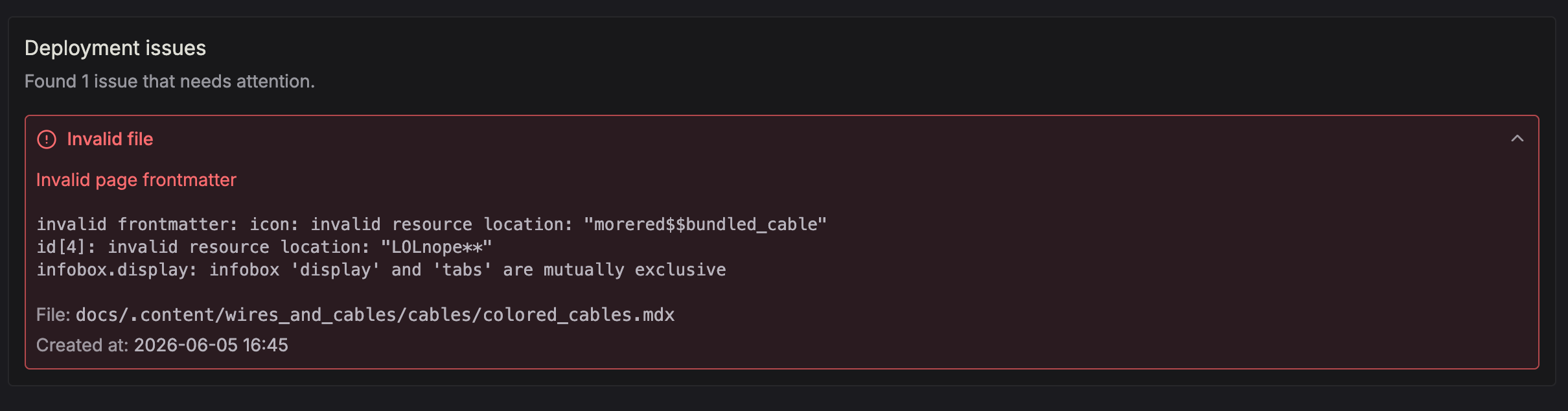
Most notably, project errors will no longer be cryptic strings of incomprehensible JSON schema validation errors. Instead, we'll show you exactly what's wrong and where, down to the line.

New documentation folder layout
The current wiki folder layout had been originally designed before the introduction of content pages and was kept backwards compatible. As a result, it was never truly intuitive to users but rather a mess of seemingly unrelated rules and exceptions.
Now, we're introducing a revised and (hopefully) future-proof "v1" format that accounts for more than just the current features. It should be easier to understand for new authors and remain consistent over time as we introduce new elements.
The following are changes from the legacy format:
-
Removed the leading
.dots from folder names and moved documentation pages into their dedicated folder -
Moved
_homepage.mdxtodocs/_index.mdx -
Item textures (inventory renders) now must be placed under the
itemfolder like so:assets/<modid>/item/<item_id>. This makes it easy for the Wiki to find assets for items knowing only the item ID. While it can be changed in places that accept an asset location, we recommend sticking with this pattern for consistency. -
Item properties are now placed under
data/<modid>/properties/item.json. This paves the way for supporting more than just item game objects on the Wiki.
It is recommended for authors to migrate to the new format following the steps above. The legacy format will continue to be supported regardless, however.
To apply the change, add the following to your sinytra-wiki.json:
{"schema": "1"}
Here's an example layout for a project using the new format:
root/├─ assets/│ ├─ mffs/│ │ ├─ item/│ │ │ ├─ steel_ingot.png│ │ ├─ lang/│ │ │ ├─ en_us.json├─ data/│ ├─ mffs/│ │ ├─ recipe/│ │ │ ├─ projector.json│ │ ├─ tags/│ │ │ ├─ item/│ │ │ │ ├─ fortron_fuel.json│ │ ├─ properties/│ │ │ ├─ item.json│ │ ├─ workbenches.json├─ content/│ ├─ machines/│ │ ├─ projector.mdx│ │ ├─ _meta.json│ ├─ _meta.json├─ docs/│ ├─ _meta.json│ ├─ _index.mdx│ ├─ getting_started.mdx├─ translated/│ ├─ de_de/│ │ ├─ docs/│ │ │ ├─ _meta.json│ │ │ ├─ getting_started.mdx├─ sinytra-wiki.json
Multi-item pages
Content pages now allow you to specify multiple item IDs per page. This works similarly to how the vanilla wiki has articles that cover multiple item variants, such as Pickaxes.
In addition, we've added a new infobox frontmatter property that allows you to customize the right sidebar of content
pages which contains the item variants and preview assets.
By default, we'll build appropriate page elements including the infobox based on the provided item IDs and available game files included in the project. Item properties will be grouped by entries when values differ between variants, just like they are on the vanilla wiki.

Here's an example frontmatter that could be used for morered's colored cables:
# Item IDs to assign to this page (affects shown properties, external markdown# links, clickable recipe items etc.)id:- morered:yellow_cable- morered:orange_cable- morered:red_cable# Either of title attribute or #H1 heading must be present for multi-item pagestitle: Cables# Optional, default values shown belowinfobox:# Title to show on top of infobox (default: page title)title: Cables# Infobox tabs (item variants)tabs:- name: Yellow Cable# Asset locations to show in large (single item or list)display: morered:item/yellow_cable# -- OR --display:- morered:item/yellow_cable- morered:item/yellow_cable_enchanted- name: Orange Cable# ...- name: Red Cable# ...# Inventory slots to show (single item or list of asset locations)inventory:- morered:item/yellow_cable- morered:item/orange_cable- morered:item/red_cable# -- OR --# Hide inventory slots completelyinventory: []
Scoped search
When browsing project documentation, the search bar can now be toggled between a "local" project-only and "global" wiki-wide scope. Try it out by pressing the TAB key when the search bar is focused.

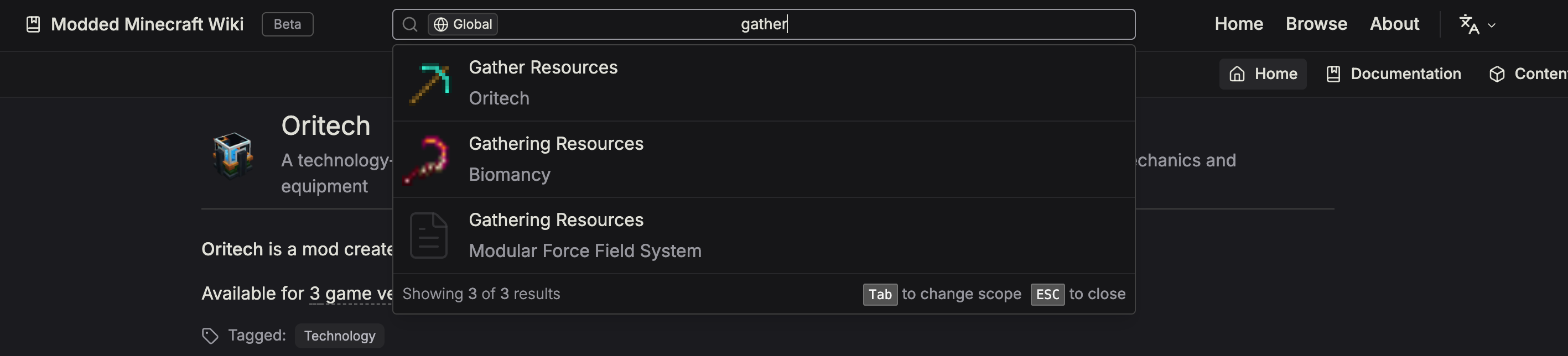
Opening search from a project page will select the Local scope by default.
New search engine
Previously, we've been relying on Elasticsearch and its web crawler, but this has proven to be difficult to work with, mainly due to its slow speeds and difficulty to automate it. Using a crawler wasn't a good approach for a website of this size in the first place. As a result, new projects remained unindexed for a long time and search results were often incomplete.
We've now moved to Typesense, which is integrated with the backend and will be immediately updated after each successful project deployment, so that all your pages are available in search as soon as possible.
Audio files
Audio files (.ogg, .mp3, .wav) can now be included in projects and pages.
To play audio in a page, use the provided Audio component, which accepts the same properties as the regular audio
except that its src attribute is an asset location.
<!-- Plays <root>/assets/examplemod/sounds/ambient.ogg --><Audio controls src="examplemod:sounds/ambient.ogg" />
Roadmap
✅ In this major update, we made the following changes:
-
🛠️ Web backend overhaul
-
📖 Multi-item content pages
-
🔍 Search locally in a single project
-
🔊 Include audio files in projects
🏗️ Features to look forward to, coming in the near future:
-
🛠️ New components for authors
-
🏠 Project homepage customization
-
⌛️ Rollback projects to previous deployments
-
...and more!
🤝 Let us know what you think!
Our team is working hard on improving the website's interface and feature set to bring you the next generation wiki for all of modded minecraft.
As always, please make sure to let us know if you have any suggestions or ideas we could implement on the wiki! Any feedback is appreciated!