
Warning
As of 26.1, More Red uses the Ex Machina framework to get all the wires and cables to connect to each other nicely.
Mods can add compatibility with the wire system by depending on Ex Machina. See the Ex Machina github for dependency information.
The Mechanical Graph
Ex Machina's Mechanical Graph system handles
- Listening to graph update requests
- Connecting mechanical blocks into graph networks
- Assigning power and angular velocity values to all blocks in the network
Blocks can be made graphable by defining mechanical component jsons in the data/<namespace>/exmachina/mechanical_component/<path>.json, where namespace and path match the id of the block to assign the component to (e.g. data/morered/exmachina/mechanical_component/oak_axle.json).
There are no default mechanical blocks; blocks will not be included in mechanical graphs unless explicitly assigned a component.
Mechanical graph updates will automatically be triggered on a block and its neighbors whenever a blockstate changes.
If this is not desired, the block can be added to the exmachina:no_automatic_mechanical_updates tag to avoid this;
blockstate updates of the block will not trigger mechanical graph updates on itself or its neighbors,
and blockstate updates on neighbors will not trigger mechanical graph updates on the block.
Mechanical graph updates can also be manually triggered on blocks via ExMachinaGameEvents#scheduleMechanicalGraphUpdate. This is not affected by the tag mentioned above (as it is the intended way to trigger mechanical updates on such blocks).
There are two default mechanical component types: exmachina:variants and exmachina:multipart, which have similar formats to blockstate jsons. Additional formats can be registered to the exmachina:mechanical_component_type registry (registry keys are available in the ExMachinaRegistries class).
Both of these will store a data attachment in the blockentity, if requested (and if the block has a blockentity):
{"neoforge:attachments": {"exmachina:mechanical_node_states": {"values": {[{"key": <nodeshape>, // can be "cube", a direction such as "north", or {"face": <direction>, "side": <direction>}"value": {"power": <double>, // power being consumed by this block, in watts"angular_velocity": <double> // how fast the block is rotating on this node in radians per second}}]}}}}
A "node shape" refers to a component of the block which can rotate and connect to other node shapes:
"cube"indicates the node is the entire block- A direction such as
"north"indicates the node is that face of the block - Two directions such as
{"face": "north", "side": "up"}indicate the node is on the up-facing quadrant of the block's north face:
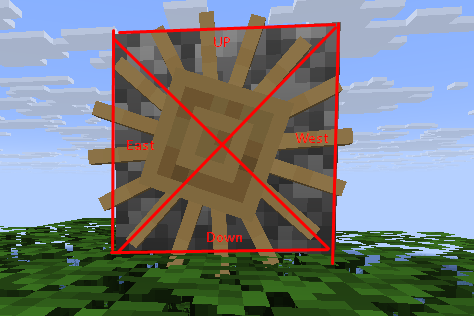
Properties of Mechanical Nodes
Mechanical nodes have:
- A nodeshape, as described above
- Inertia (in kg*m^2), which "slows down" the machines; the graph's total angular speed is equal to its total torque divided by total inertia
- Torque, if the block is a power source, such as a windmill. Has units of newton-meters.
- Torque and angular velocity follow a right-hand rule; curl your hand and let the fingers point in the direction of rotation. If the thumb points toward a positive minecraft direction (up/south/east), torque is positive. Otherwise (down/north/west), torque is negative.
- Counter-torque, how much torque to subtract from total torque when active torque is applied to the node. Can be used to simulate friction in grinding blocks.
- "Teeth", a property used by gears. If two connected nodes have zero teeth, has no effect. If both nodes have positive teeth, a gearshift occurs at the connection, multiplying the speed of nodes downstream of power sources by the ratio between the gear teeth, and dividing the effective torque felt by downstream nodes by the same amount. For example, the gearshifter can double speed and halve torque, or vice-versa, thanks to its two internal nodes with a teeth ratio of 2.
- Parity is a property of the connections between nodes. Nodes can only connect if both attempt to connect with the same parity (positive or negative). If both nodes connect with negative parity, rotation inverts (think two parallel gears meshed together).
Variants Mechanical Component
The exmachina:variants mechanical component has the following format:
{"type": "exmachina:variants","save": <boolean>, // if true, power will automatically be saved and synced via the exmachina:mechanical_node_states attachment"variants": {<variant>: [ // state selector in the same format as variants blockstate jsons, e.g. "side=down,waterlogged=false"{ // list of mechanical nodes in this blockstate:"shape": <nodeshape>, // nodeshape of this node as described above"torque": <double>, // how much torque in newton-meters this block generates (may be negative to indicate rotation direction)"positive_counter_torque": <double>, // how much passive torque (e.g. from friction) to subtract from total torque in the system when active torque on this block > 0"negative_counter_torque": <double>, // how much passive torque to subtract from total torque when active torque on this block < 0,"inertia": <double>, // how much inertia this node has. Speed of the graph is total torque divided by total inertia."connections": [ // list of nodes this node can connect to:"neighbor_shape": <nodeshape>, // shape of neighbor node to attempt to connect to"direction": <string>, // optional direction to neighbor block, e.g. "north". If not present, will connect to other nodes in this block."parity": "positive" or "negative", // if negative, inverts rotation parity. Defaults to positive if not present"teeth": <integer> // Defaults to 0 if not specified; if positive for both sides of the connection, creates a gear change equal to the ratio between teeth]}]}}
For example, the morered:oak_axle mechanical component:
{"type": "exmachina:variants","save": true,"variants": {"axis=x": {"connections": [{"direction": "east","neighbor_shape": "west"},{"direction": "west","neighbor_shape": "east"}],"inertia": 0.02,"shape": "cube"},"axis=y": {"connections": [{"direction": "up","neighbor_shape": "down"},{"direction": "down","neighbor_shape": "up"}],"inertia": 0.02,"shape": "cube"},"axis=z": {"connections": [{"direction": "south","neighbor_shape": "north"},{"direction": "north","neighbor_shape": "south"}],"inertia": 0.02,"shape": "cube"}}}
Multipart Mechanical Component
The exmachina:multipart mechanical component has a similar format to multipart blockstate jsons, except that it assigns node objects (in the same format as variants above) to blockstate selectors instead of model ids.
{"type": "exmachina:multipart","save": <boolean>, // if true, power will automatically be saved and synced via the exmachina:mechanical_node_states attachment"multipart": [ // list of multipart selectors{"when": {}, // same format as blockstate multipart selectors, e.g. {"down": true, "waterlogged": false}"apply": [{// node object, same format as in variants}]}]}
See the gears mechanical component for an example.
The Signal Graph
Ex Machina's Signal Graph system handles
- Listening to graph update requests
- The connecting of wire blocks and assembling them into graph networks
- Determining the highest input signal provided to a given signal graph
- Updating all wire blocks in the graph simultaneously (avoiding cascading block updates)
- Updating non-graph neighbor blocks adjacent to the graph
Blocks can be made graphable by assigning signal components to blocks via the data/exmachina/data_maps/block/signal_component.json data map.
A block with no datamap components acts as a default signal source, which connects to wires and provides its vanilla signal to the graph if it meets these conditions:
- It provides vanilla redstone signal
- It can connect to redstone dust (
IBlockExtension#canConnectRedstonereturns true) - Its block support shape reaches the side of the block adjacent to a connecting wire and is at least as large as a Red Alloy Wire cross-section (2x2 sixteenths at the center of the edge of the block)
Ex Machina also assigns additional signal components to vanilla blocks which ought to connect to wires but do not meet this criteria:
{"values": {"#exmachina:wirable/cube": { // trapped chests"type": "exmachina::cube", // wires on any adjacent face can connect to the block"receives_power": true // block update occurs on this block after each graph update},"#exmachina:wirable/floor": { // redstone floor torches, detector rails, pressure plates"type": "exmachina:floor", // wires on the floor next to the block can connect to it"receives_power": true},"#exmachina:wirable/inverted_wall_floor_ceiling": { // buttons, levers, redstone wall torches"type": "exmachina:wall_floor_ceiling", // wires attached to the same wall as the block can connect to it"invert_horizontal_facing": true,"receives_power": true},"redstone_wire": {"type": "exmachina:floor","offset": -1, // one unit of redstone power is lost when wires receive signal from redstone dust"receives_power": true}}}
Mods with similar blocks can add compatibility without compiling against Ex Machina by adding them to these tags, or by adding them to a datamap using exmachina's builtin source types (cube, floor, wall_floor_ceiling).
Mods which wish to add specialized compatibility (such as for interfacing with bundled cables) should depend on Ex Machina
and register signal component codecs to the exmachina:signal_component_type registry for their block (registry keys for deferredregisters are available in ExMachinaRegistries)
which can be referred to in the data maps.
Graph updates can be requested by invoking ExMachinaGameEvents#scheduleSignalGraphUpdate(BlockPos), which causes a graph update to occur at that position
at the end of the current level tick.
Blocks which act as both signal graph transmitters and provide vanilla redstone signal should be added to the exmachina:ignore_vanilla_signal block tag.