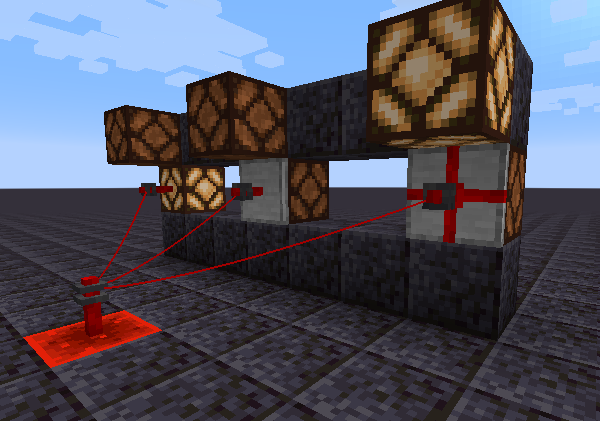
Redwire Relays, Redwire Junctions, and Redwire Posts are blocks that can be connected to each other via a Redwire Spool to transmit redstone power to each other across long distances.
Lit and unlit Redwire Posts, Redwire Relays, and Redwire Junctions, respectively
Redwire Relays can be placed in 6 different orientations, on walls, floors, and ceilings. When placing the block, the flat side will be placed against the face clicked by the player.
Redwire Relays can be connected to other Redwire Relays,
Redwire Junctions,
or Redwire Posts
by using a Redwire Spool on two such blocks sequentially.
Using the spool on two connected blocks sequentially will disconnect them.
Redwire Relays (unlike posts and junctions) do not transmit redstone signals to adjacent blocks;
they can only connect to blocks by being wired together with a spool.
When an input signal changes, all connected posts will update their power level simultaneously with wires.
Different types of redwire posts transmitting and receiving power
Data
Blockstate Properties
Values
Description
facing
{"down", "up", "north", "south", "west", "east"}
Direction to the neighbor block the post is attached to
Set when the block is rotated/mirrored by structure generation or similar mechanics; it ensures positional blockentity data is transformed accordingly. When placed by a player, this will always be "identity".
power
[0,15]
Redstone power level of the block
waterlogged
{"false", "true"}
Whether the block is waterlogged
BlockEntity Data
Format
Description
connections
List of block positions in [X,Y,Z] format
e.g. [[2, 5, -6], [2, 5, -9]]
Relative distances to other blocks which this post is connected to
History
Version
Changelog
1.21.8-8.0.0.0
Added waterlogged blockstate property
1.21.3-7.0.0.0
Rewrote how wires connect and transmit power; all wires in a network update at once instead of causing cascading block updates
Renamed from Redwire Post Plate to Redwire Relay (redwire_post_plate -> redwire_relay
No longer loses power over distance; instead has a maximum network size (default 1024, configurable)
1.20.1-4.0.0.0
Added transform blockstate property
connections are now stored as relative positions instead of absolute positions
1.16.5-2.1.0.0
Added "morered:redwire_posts" and "morered:bundled_cable_posts" block tags; added relevant blocks to these tags
1.16.3-2.0.0.0
Added Redwire Posts (without plates) and Redwire Post Plates (without connections to neighbors)
More Red recipes now use tag ingredients instead of specific items in more places
Trying to place a block where a redstone wire post wire is is now denied on the client in addition to the server (this will help prevent "phantom blocks" in high-latency situations)