
How to get to the Animation window
-
Open your AzureLib project in Blockbench and you'll see (by default) to the far right side a tab called
Animate -
Click this and you will now now be in the Animation tab.
-
Create a new animation in the Animations panel on the left side by pressing the + icon and name it whatever you want. (Example: animation.idle)
-
You can select the bones and start animating!
Here is a video guide that covers some basics of animating in Blockbench, it's not exactly for AzureLib but applies about 90%
How to use use Easings
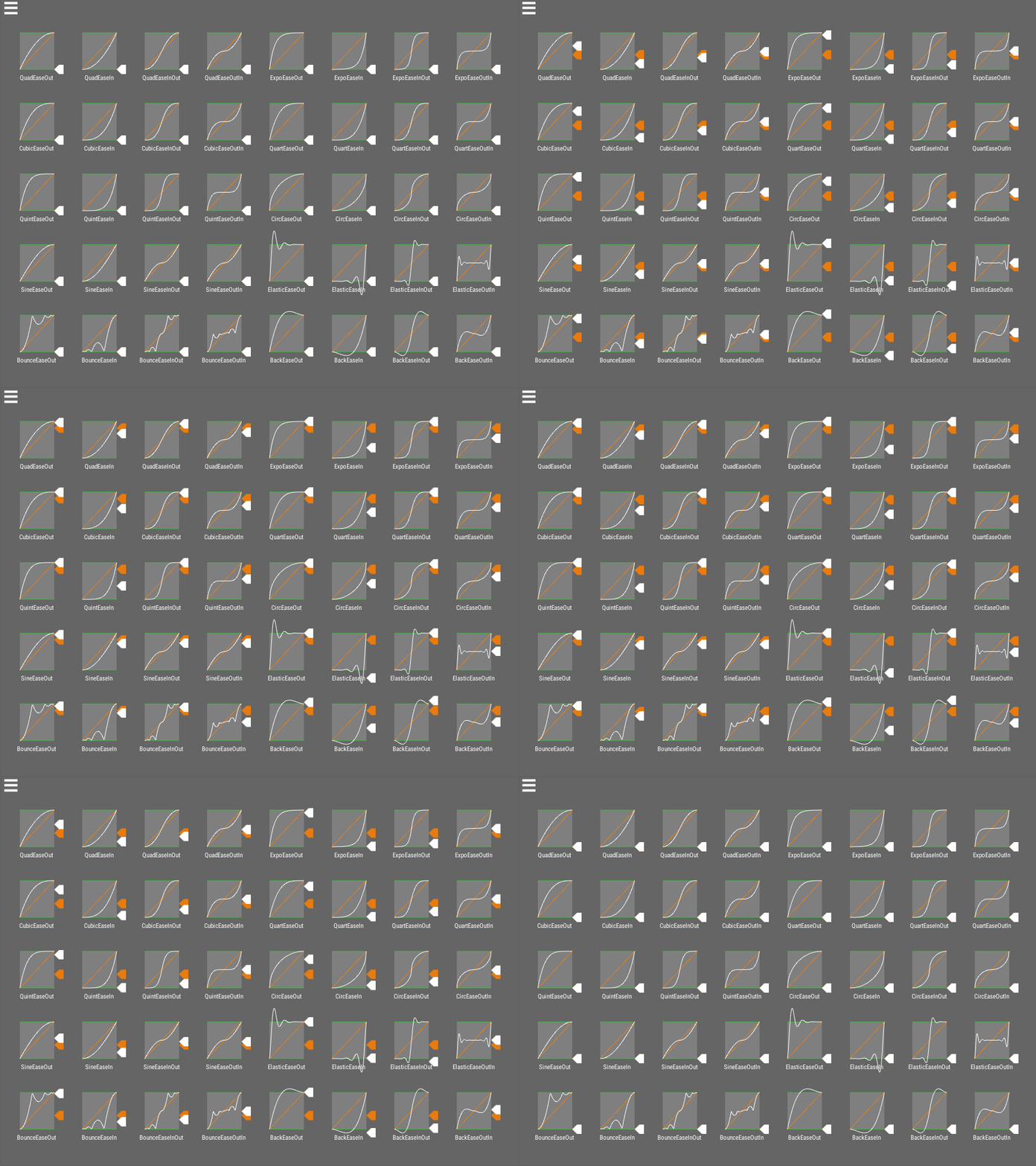
What is an Easing Curve? An easing curve is a mathematical function used to make animations feel more natural and dynamic. Instead of using a straight, linear transition, it controls how the animation progresses over time.
How Does it Work?
Rather than moving at a constant speed, the animation's progress (or "tween") follows the shape of the easing curve. This allows for a variety of effects, such as:
- Smooth start and stop: The animation gradually speeds up and slows down.
- Overshooting: An object goes past its destination and slides back into place (using a "back" curve).
- Bouncing: An object bounces as it reaches its target (using a "bounce" curve).
Easing curves help make animations look more realistic and visually appealing.
How to use Molang
Molang empowers you to input mathematical expressions as keyframe values, extending beyond mere numerical inputs. You can employ mathematical functions such as math.sin, math.cos, and math.abs. Detailed information on these math functions can be found on the Bedrock Wiki.
Variables and Multi-Statement Expressions
A keyframe value can do more than a single calculation. You can store values in variables, write several statements separated by ;, and use conditionals, blocks and loops:
t.wave = math.sin(q.anim_time * 360);q.is_on_ground ? { v.air_time = 0; } : { v.air_time = (v.air_time ?? 0) + 1; };return t.wave * 10 + math.min(v.air_time, 20);
temp./t.variables are scratch values. They start at 0 every time the keyframe is evaluated.variable./v.variables belong to the entity, block or item being animated. Each one keeps its own values between frames, and a value set in one keyframe can be read in any other keyframe of the same animatable.v.name ?? 1usesv.nameif it has been set, otherwise 1. This is handy for giving a variable a starting value.returnends the expression with a value. Without one, the last statement's value is used.- Queries,
context.names andmath.constants are read-only.
See Expression Syntax for the full list of operators and statements, and Driving variable.* from Code for setting variables from your mod.
Supported Queries
Every query can be written with the full query. prefix or the short q. prefix, so query.is_on_ground and q.is_on_ground are the same query. Queries that don't apply to what's being animated (for example query.health on an item) return 0. Values that are true or false return 1 or 0.
General
query.anim_time- Represents the animation time in seconds.
query.life_time- Represents the total lifetime of the entity or object, in seconds.
query.actor_count- Returns the number of entities currently loaded in the world.
query.time_of_day- Represents the current time of day in the game as a fraction (0.0 to 1.0).
query.day- Returns the current day of the world.
query.time_stamp- Returns the world's game time in ticks.
query.moon_phase- Returns the current phase of the moon as an integer (0 = full moon to 7).
query.moon_brightness- Returns how bright the moon is, from 1.0 (full moon) to 0.0 (new moon).
query.frame_alpha- Returns how far between two game ticks the current frame is (0.0 to 1.0).
query.client_max_render_distance- Returns the client's render distance in chunks.
Entity State
query.is_alive- Returns whether the entity is alive.
query.is_on_ground- Returns whether the entity is on the ground.
query.in_air- Returns whether the entity is currently off the ground (e.g., jumping or falling).
query.is_moving- Returns whether the entity moved since the last tick, in any direction.
query.is_in_water- Returns whether the entity is currently in water.
query.is_in_water_or_rain- Returns whether the entity is in water or exposed to rain.
query.head_is_in_water- Returns whether the entity's head is underwater.
query.is_in_lava- Returns whether the entity is in lava.
query.is_on_fire(orquery.is_onfire)- Returns whether the entity is on fire.
query.is_fire_immune- Returns whether the entity is immune to fire.
query.is_invisible- Returns whether the entity is invisible.
query.is_silent- Returns whether the entity is silent.
query.is_sneaking- Returns whether the entity is sneaking (crouching).
query.is_sprinting- Returns whether the entity is sprinting.
query.is_swimming- Returns whether the entity is swimming: the swimming pose for players, floating in water for other entities.
query.is_gliding- Returns whether the entity is gliding with an elytra.
query.is_sleeping- Returns whether the entity is sleeping.
query.is_riding- Returns whether the entity is riding another entity.
query.has_rider- Returns whether another entity is riding this entity.
query.is_leashed- Returns whether the entity is leashed.
query.is_tamed- Returns whether the entity is tamed.
query.is_sitting- Returns whether a tamed entity is sitting.
query.is_baby- Returns whether a living entity is a baby.
query.has_gravity- Returns whether the entity is affected by gravity.
query.has_collision- Returns whether the entity collides with blocks.
query.is_spectator- Returns whether the entity (a player) is in spectator mode.
query.is_local_player- Returns whether the entity is the player playing on this client.
query.is_first_person- Returns whether the entity is the camera entity and the camera is in first person. In an item's animation, whether the item is drawn in a first-person hand.
Health and Combat
query.health- Returns the current health of a living entity.
query.max_health- Returns the maximum health of a living entity.
query.hurt_time- Returns the remaining time in the entity's hurt animation.
query.death_ticks- Returns the number of ticks since the entity started dying.
query.is_blocking(orquery.blocking)- Returns whether the entity is actively blocking (e.g., holding a shield in defense).
query.has_target- Returns whether a mob has an attack target. Needs the target on the client; see
AzMolangTargetProvider.
- Returns whether a mob has an attack target. Needs the target on the client; see
query.target_x_rotation- Returns the pitch, in degrees, needed to look at the attack target's eyes (negative is up), or 0.
query.target_y_rotation- Returns the world yaw, in degrees, needed to face the attack target, or 0.
Movement and Rotation
query.ground_speed- Returns the entity's horizontal speed, in blocks per second.
query.vertical_speed- Returns how fast the entity is moving up (positive) or down (negative), in blocks per second.
query.yaw_speed- Represents the rate of change of the entity's yaw (horizontal rotation).
query.limb_swing- Represents the current state of the entity's limb swinging animation (e.g., for walking or running).
query.limb_swing_amount- Represents the intensity or speed of the entity's limb swing animation.
query.head_pitch(orquery.head_x_rotation)- Represents the vertical rotation of the entity's head (looking up or down).
query.head_yaw(orquery.head_y_rotation)- Represents the horizontal rotation of the entity's head relative to the body.
query.body_x_rotation- Returns the entity's body pitch, in degrees.
query.body_y_rotation- Returns the entity's body yaw, in degrees.
query.cardinal_facing_2d- Returns the direction the entity is facing (2 = north, 3 = south, 4 = west, 5 = east).
query.distance_from_camera- Returns the distance between the entity or object and the camera/player.
query.model_scale- Returns the entity's scale.
query.swim_amount- Returns how far the entity is into its swimming pose (0.0 to 1.0).
Items and Equipment
query.is_using_item- Returns whether the entity is actively using an item (e.g., eating or drinking).
query.item_in_use_duration- Returns how long the entity has been using its current item, in seconds, up to the item's use duration.
query.item_remaining_use_duration- Returns how long the entity has left to use its current item, in seconds.
query.item_max_use_duration- Returns the full use time of the item being used, in seconds.
query.has_head_gear- Returns whether the entity has an item in its head slot.
query.equipment_count- Returns the number of armor pieces the entity is wearing (0 to 4).
query.player_level- Returns the player's experience level, or 0 for non-players.
query.item_current_durability- Represents an item's durability as a fraction of its maximum durability.
query.max_durability- Returns the maximum durability of the item being animated.
query.remaining_durability- Returns how much durability the item being animated has left.
query.item_is_enchanted- Returns whether the item is enchanted.
Query Functions
These queries take arguments, so they are always written with parentheses, e.g. query.position(1). Arguments can be numbers or any other Molang expression.
query.position(axis)- Returns the entity's world position on an axis (0 = x, 1 = y, 2 = z).
query.position_delta(axis)- Returns how far the entity is moving this tick on an axis.
query.movement_direction(axis)- Returns the entity's normalized movement direction on an axis.
query.count(value, ...)- Returns the number of elements in an array; anything else counts as 1.
query.get_nearby_entities(radius[, 'entity_id'])/query.get_nearby_entities_except_self(...)- Returns an array of living entities within
radiusblocks (at most 64), nearest first, for use withfor_each.
- Returns an array of living entities within
query.get_equipped_item_name([hand])- Returns the held item's id without its namespace, e.g.
'bow'. Hand is'main_hand'(default) or'off_hand'.
- Returns the held item's id without its namespace, e.g.
query.is_item_name_any(slot, index, 'id', ...)- Returns whether the item in a slot such as
'slot.weapon.mainhand'or'slot.armor.head'is any of the given ids.
- Returns whether the item in a slot such as
query.equipped_item_any_tag(slot, 'tag', ...)/query.equipped_item_all_tags(slot, 'tag', ...)- Returns whether the item in the slot has any / all of the given item tags.
query.is_name_any('name', ...)- Returns whether the entity's name (name tag, player name or type name) is any of the given strings.
query.is_item_equipped(hand)- Returns whether a hand holds an item (0 or
'main_hand', 1 or'off_hand'). The hand can be left out to check the main hand:query.is_item_equipped().
- Returns whether a hand holds an item (0 or
query.has_armor_slot(slot)- Returns whether an armor slot has an item (0 = head, 1 = chest, 2 = legs, 3 = feet).
query.armor_damage_slot(slot)- Returns the damage value of the item in an armor slot.
query.heightmap(x, z)- Returns the height of the world surface at a world position.
query.above_top_solid(x, z)- Returns the height just above the highest solid block at a world position.
query.camera_distance_range_lerp(near, far)- Returns 0 when the camera is closer than
near, 1 when it's further thanfar, and blends between them. Useful for fading out small detail animations at range.
- Returns 0 when the camera is closer than
query.all(value, a, b, ...)- Returns 1 if every value after the first equals the first.
query.any(value, a, b, ...)- Returns 1 if any value after the first equals the first.
query.approx_eq(a, b, ...)- Returns 1 if all the values are equal within floating point precision. Safer than
==for values that came out of math.
- Returns 1 if all the values are equal within floating point precision. Safer than
query.in_range(value, min, max)- Returns 1 if the value is between
minandmax, inclusive.
- Returns 1 if the value is between
How to add Effect Keyframes
Please see Adding Effect Keyframes for this.
Previewing Rig Features While Animating
The AzureLib Rig panel previews its features on top of the animation you're editing:
- IK chains and look-at solve every frame towards a preview target: raised ground, a fixed point, or a locator you can drag around.
- Spring bones swing while the animation plays. Press play to see them; scrubbing backwards resets them.
- Constraints keep IK, look-at and spring bones within their limits, and can clamp the animation itself.
- Blend spaces have a
▶button that plays their samples together, with sliders for the input.
None of this changes your keyframes. Switch Pose off in the panel to see your animation alone.

See Setting Up Rig Features for setting each one up.